> ## Documentation Index
> Fetch the complete documentation index at: https://docs.callkaro.ai/llms.txt
> Use this file to discover all available pages before exploring further.
# In-Call Functions
> Execute actions during active AI calls
## Overview
In-call functions execute **during** active AI calls when triggered by the AI agent. These allow your agent to perform real-time actions based on conversation context.
**Common Use Cases:**
* Check product availability
* Book appointments (custom systems)
* Validate customer information
* Query databases
* Call external APIs for live data
## Execution Timing
```
[Call Starts] → [Conversation] → [AI Triggers Function] → [Function Executes] → [AI Responds with Result]
```
The AI agent decides when to call the function based on the description you provide.
## Basic Mode
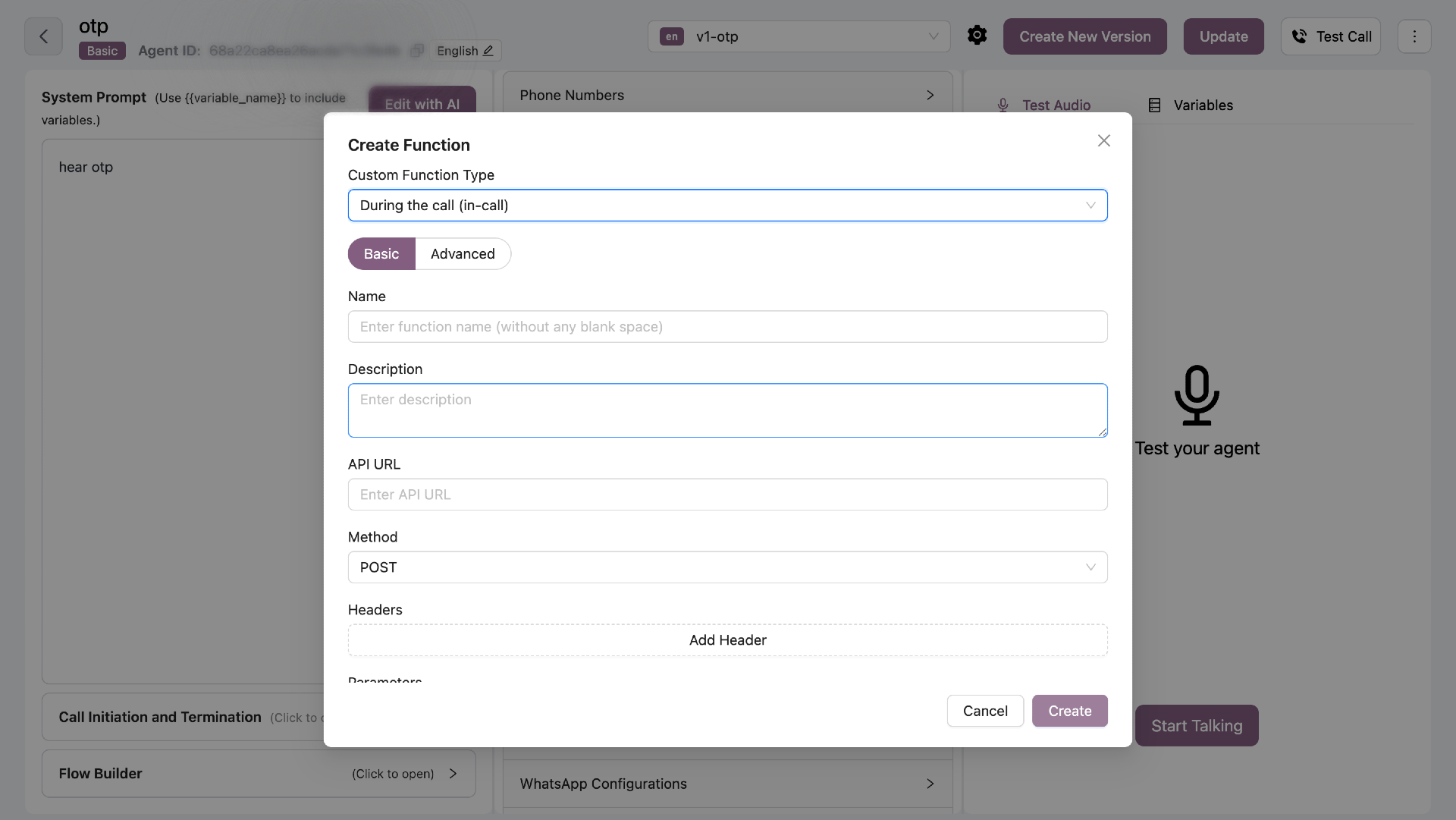
Configure API integrations with parameters that AI can fill.
 ### Configuration Fields
| Field | Required | Description |
| ----------- | -------- | ---------------------------------- |
| Name | Yes | Function name (no spaces) |
| Description | Yes | When AI should call this function |
| API URL | Yes | Endpoint to call |
| Method | Yes | GET, POST, PUT, or DELETE |
| Headers | No | Authentication headers |
| Parameters | Yes | Typed parameters with descriptions |
### Description (AI Trigger)
The description tells the AI **when** to call this function.
**Example:**
```
Check product availability when customer asks if an item is in stock
```
The AI will automatically call this function when it detects the customer asking about stock.
### Parameters Configuration
Each parameter needs:
* **Key Name** - Parameter name
* **Type** - string or number
* **Description** - What this parameter represents
**Example Parameters:**
```
Key: product_id
Type: string
Description: The unique product identifier
Key: quantity
Type: number
Description: Quantity customer wants to purchase
```
The AI will extract these values from the conversation and pass them to your API.
## Advanced Mode (Python)
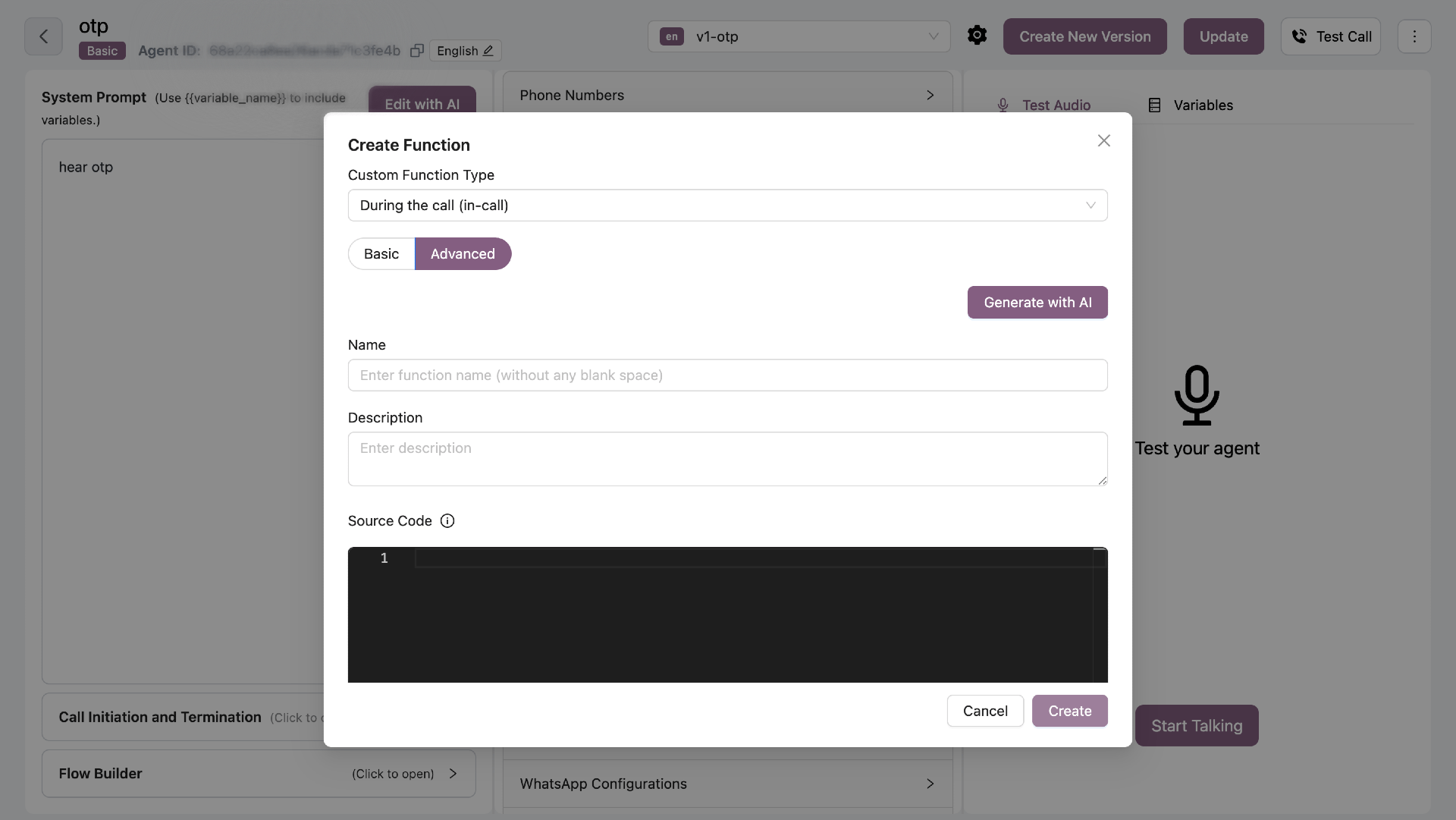
Write custom Python code with full control.
### Configuration Fields
| Field | Required | Description |
| ----------- | -------- | ---------------------------------- |
| Name | Yes | Function name (no spaces) |
| Description | Yes | When AI should call this function |
| API URL | Yes | Endpoint to call |
| Method | Yes | GET, POST, PUT, or DELETE |
| Headers | No | Authentication headers |
| Parameters | Yes | Typed parameters with descriptions |
### Description (AI Trigger)
The description tells the AI **when** to call this function.
**Example:**
```
Check product availability when customer asks if an item is in stock
```
The AI will automatically call this function when it detects the customer asking about stock.
### Parameters Configuration
Each parameter needs:
* **Key Name** - Parameter name
* **Type** - string or number
* **Description** - What this parameter represents
**Example Parameters:**
```
Key: product_id
Type: string
Description: The unique product identifier
Key: quantity
Type: number
Description: Quantity customer wants to purchase
```
The AI will extract these values from the conversation and pass them to your API.
## Advanced Mode (Python)
Write custom Python code with full control.
 ### Function Signature
```python theme={null}
async def function_name(
ctx: RunContext,
param1: str,
param2: int = 1
) -> dict:
"""
Function description for AI
Args:
ctx: LiveKit RunContext
param1: Description of param1
param2: Description of param2
Returns:
dict: {
status: "success" | "error",
data: { ... }
}
"""
# Your code here
```
**Rules:**
* Must be `async def`
* First parameter must be `ctx: RunContext`
* All parameters must have type annotations
* Must include detailed docstring
* Must return dict with `status` field
### Return Schema
Always return a dictionary with at least a `status` field:
```python theme={null}
# Success
return {
"status": "success",
"data": {"available": True, "quantity": 50}
}
# Error
return {
"status": "error",
"message": "Product not found"
}
```
### Example: Check Weather
```python theme={null}
async def get_weather(
ctx: RunContext,
location: str,
days: int = 1
) -> dict:
"""
Get weather forecast for a location.
Args:
ctx: RunContext object
location: City name or coordinates
days: Number of days for forecast (1-7)
Returns:
dict: {
status: "success" | "error",
location: str,
forecast: list[dict]
}
"""
# Input validation
if not location or not isinstance(location, str):
return {
"status": "error",
"message": "Location is required"
}
if not 1 <= days <= 7:
return {
"status": "error",
"message": "Days must be between 1 and 7"
}
try:
# Make API call with timeout
async with httpx.AsyncClient(timeout=10.0) as client:
response = await client.get(
"https://api.weatherapi.com/v1/forecast.json",
params={
"key": "YOUR_API_KEY",
"q": location,
"days": days
}
)
if response.status_code != 200:
return {
"status": "error",
"message": f"Weather API error: {response.status_code}"
}
data = response.json()
return {
"status": "success",
"location": data["location"]["name"],
"forecast": [
{
"date": day["date"],
"condition": day["day"]["condition"]["text"],
"max_temp": day["day"]["maxtemp_c"]
}
for day in data["forecast"]["forecastday"]
]
}
except httpx.RequestError as e:
logger.error(f"Weather API request failed: {e}")
return {
"status": "error",
"message": "Failed to fetch weather data"
}
```
## AI Generation
Click **"Generate with AI"** to create functions using natural language.
**Example Prompt:**
```
Create a function to check product availability from our inventory API.
It should take product_id as parameter and return stock quantity.
API endpoint: https://api.example.com/inventory/check
```
The AI generates complete code with error handling, validation, and proper return schema.
## Allowed Types
**Parameter Types:**
* `str`, `int`, `float`, `bool`
* `None`
* `dict`, `list`
* JSON-serializable types
**Not Allowed:**
* File objects
* Custom classes
* Functions/lambdas
* Non-serializable objects
## Security Requirements
* ✅ **Input Validation** - Always validate inputs
* ✅ **No Filesystem** - Never read/write files
* ✅ **No OS/Process** - Avoid subprocess, os.system
* ✅ **No Eval** - Never use eval() or exec()
* ✅ **Timeouts** - Set timeouts for external calls
* ✅ **Error Handling** - Catch and return errors properly
## Best Practices
* **Keep functions focused** - One function, one purpose
* **Validate inputs** - Check all parameters before use
* **Set timeouts** - Don't let API calls hang
* **Return clear errors** - Help AI understand what went wrong
* **Log important events** - Use logger for debugging
* **Handle edge cases** - Test with various inputs
Write detailed descriptions and docstrings - they help the AI know when and how to call your function.
### Function Signature
```python theme={null}
async def function_name(
ctx: RunContext,
param1: str,
param2: int = 1
) -> dict:
"""
Function description for AI
Args:
ctx: LiveKit RunContext
param1: Description of param1
param2: Description of param2
Returns:
dict: {
status: "success" | "error",
data: { ... }
}
"""
# Your code here
```
**Rules:**
* Must be `async def`
* First parameter must be `ctx: RunContext`
* All parameters must have type annotations
* Must include detailed docstring
* Must return dict with `status` field
### Return Schema
Always return a dictionary with at least a `status` field:
```python theme={null}
# Success
return {
"status": "success",
"data": {"available": True, "quantity": 50}
}
# Error
return {
"status": "error",
"message": "Product not found"
}
```
### Example: Check Weather
```python theme={null}
async def get_weather(
ctx: RunContext,
location: str,
days: int = 1
) -> dict:
"""
Get weather forecast for a location.
Args:
ctx: RunContext object
location: City name or coordinates
days: Number of days for forecast (1-7)
Returns:
dict: {
status: "success" | "error",
location: str,
forecast: list[dict]
}
"""
# Input validation
if not location or not isinstance(location, str):
return {
"status": "error",
"message": "Location is required"
}
if not 1 <= days <= 7:
return {
"status": "error",
"message": "Days must be between 1 and 7"
}
try:
# Make API call with timeout
async with httpx.AsyncClient(timeout=10.0) as client:
response = await client.get(
"https://api.weatherapi.com/v1/forecast.json",
params={
"key": "YOUR_API_KEY",
"q": location,
"days": days
}
)
if response.status_code != 200:
return {
"status": "error",
"message": f"Weather API error: {response.status_code}"
}
data = response.json()
return {
"status": "success",
"location": data["location"]["name"],
"forecast": [
{
"date": day["date"],
"condition": day["day"]["condition"]["text"],
"max_temp": day["day"]["maxtemp_c"]
}
for day in data["forecast"]["forecastday"]
]
}
except httpx.RequestError as e:
logger.error(f"Weather API request failed: {e}")
return {
"status": "error",
"message": "Failed to fetch weather data"
}
```
## AI Generation
Click **"Generate with AI"** to create functions using natural language.
**Example Prompt:**
```
Create a function to check product availability from our inventory API.
It should take product_id as parameter and return stock quantity.
API endpoint: https://api.example.com/inventory/check
```
The AI generates complete code with error handling, validation, and proper return schema.
## Allowed Types
**Parameter Types:**
* `str`, `int`, `float`, `bool`
* `None`
* `dict`, `list`
* JSON-serializable types
**Not Allowed:**
* File objects
* Custom classes
* Functions/lambdas
* Non-serializable objects
## Security Requirements
* ✅ **Input Validation** - Always validate inputs
* ✅ **No Filesystem** - Never read/write files
* ✅ **No OS/Process** - Avoid subprocess, os.system
* ✅ **No Eval** - Never use eval() or exec()
* ✅ **Timeouts** - Set timeouts for external calls
* ✅ **Error Handling** - Catch and return errors properly
## Best Practices
* **Keep functions focused** - One function, one purpose
* **Validate inputs** - Check all parameters before use
* **Set timeouts** - Don't let API calls hang
* **Return clear errors** - Help AI understand what went wrong
* **Log important events** - Use logger for debugging
* **Handle edge cases** - Test with various inputs
Write detailed descriptions and docstrings - they help the AI know when and how to call your function.