> ## Documentation Index
> Fetch the complete documentation index at: https://docs.callkaro.ai/llms.txt
> Use this file to discover all available pages before exploring further.
# Post-Call Functions
> Process call data and execute logic after calls end
## Overview
Post-call functions execute **after** AI calls end. They process call data, update systems, and trigger workflows based on call outcomes.
**Common Use Cases:**
* Calculate next date of action (NDOA)
* Update CRM with call results
* Send follow-up emails
* Trigger webhooks
* Generate reports
* Schedule callbacks
## Execution Timing
```
[Call Ends] → [Post-Call Function Executes] → [Results Saved]
```
Post-call functions run automatically after every call, allowing you to process call data and take action.
## Basic Mode
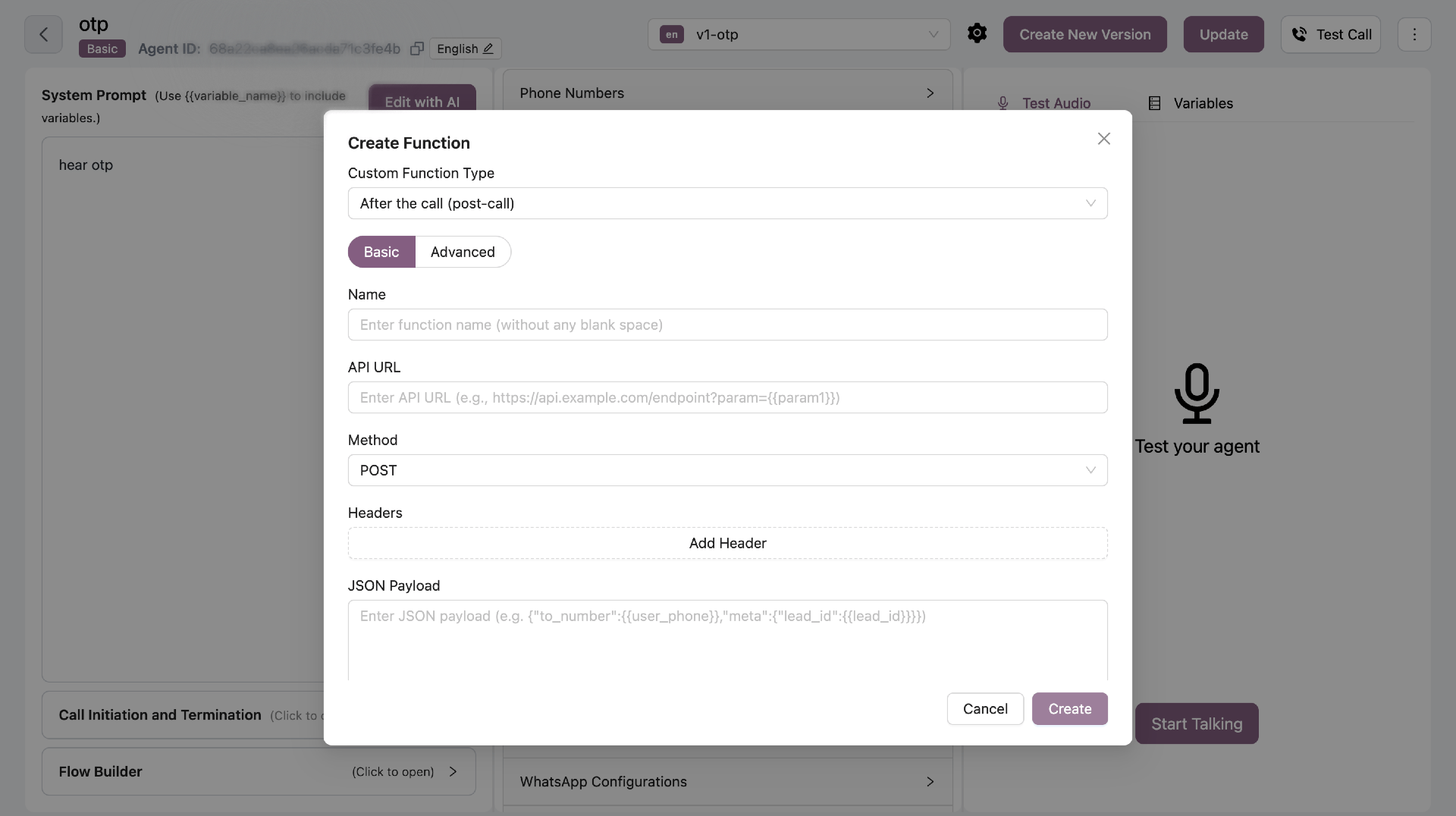
Configure API integrations with JSON parameter mapping.
 ### Configuration Fields
| Field | Required | Description |
| ---------- | -------- | ------------------------------------- |
| Name | Yes | Function name (no spaces) |
| API URL | Yes | Endpoint to call (supports variables) |
| Method | Yes | GET, POST, PUT, or DELETE |
| Headers | No | Authentication headers |
| Parameters | Yes | JSON with variable mapping |
| Condition | Yes | When to trigger this function |
### URL Variable Mapping
Include variables in URL using double curly braces:
**Example:**
```
https://api.example.com/leads/{lead_id}/update
```
Map each variable to call data:
* `lead_id` from call\_metadata
* `call_status` from post\_call variables
### JSON Parameters
Define JSON structure with variables and map each to its source from call metadata or post-call analysis.
### Conditional Execution
Control **when** your post-call function runs by adding conditions.
**Call Type Filter:**
* **All** - Run for all calls (default)
* **Connected** - Only run for connected calls (duration > 0)
* **Not Connected** - Only run for missed/failed calls
**Variable Conditions:**
Add conditions based on call metadata or post-call variables. The function runs only when **all conditions match** (AND logic).
**Example Conditions:**
* Call Metadata: `lead_source` equals `"website"`
* Post Call Variable: `interested` equals `true`
* Call Type: Connected only
**Use Cases:**
* Send confirmation email only when `confirmation` is true
* Update CRM only for connected calls
* Schedule callback only when `interested` is true and call was not connected
All conditions must match for the function to execute. This ensures precise control over when your post-call logic runs.
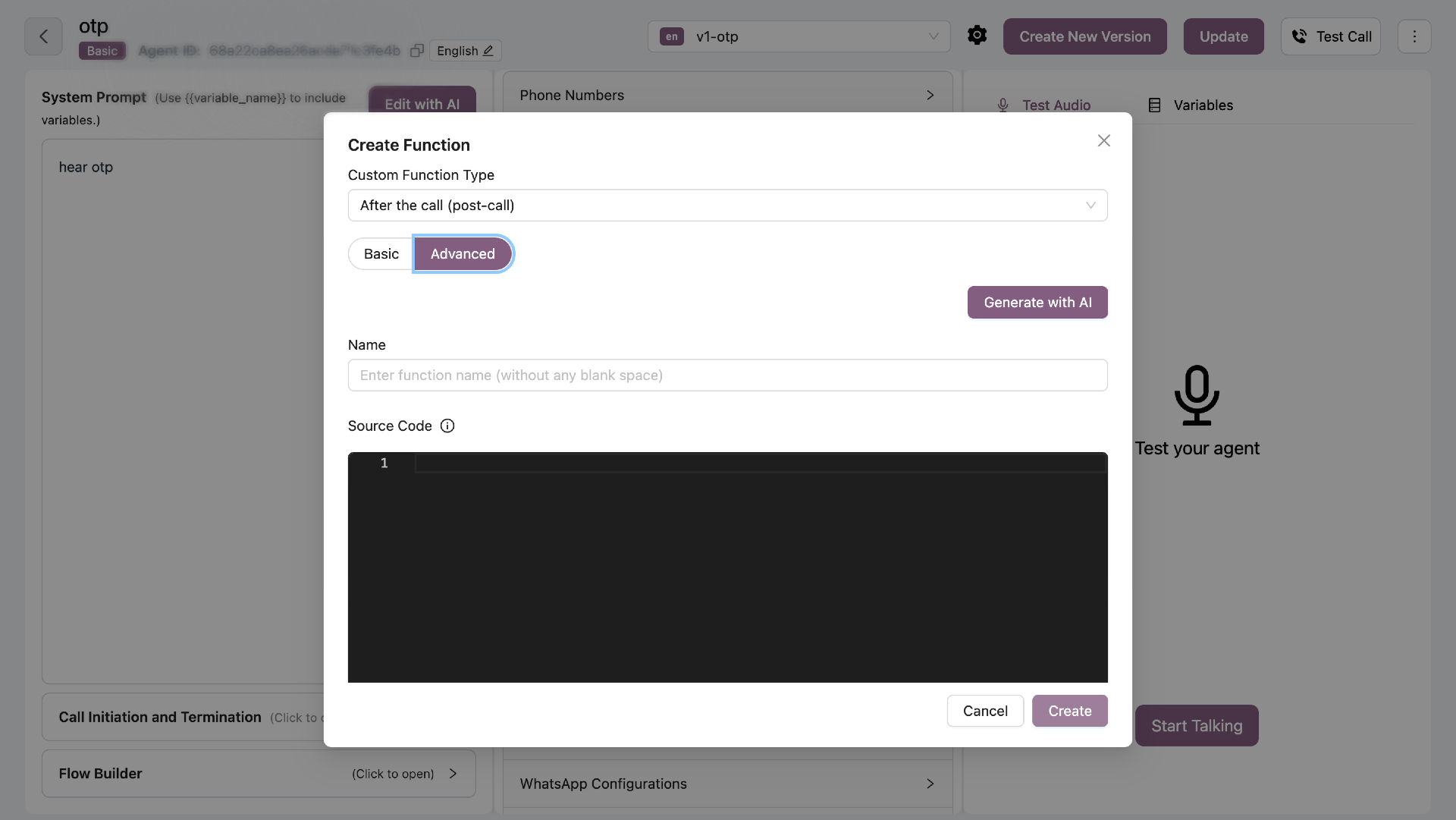
## Advanced Mode (JavaScript)
Write custom JavaScript for complex business logic.
### Configuration Fields
| Field | Required | Description |
| ---------- | -------- | ------------------------------------- |
| Name | Yes | Function name (no spaces) |
| API URL | Yes | Endpoint to call (supports variables) |
| Method | Yes | GET, POST, PUT, or DELETE |
| Headers | No | Authentication headers |
| Parameters | Yes | JSON with variable mapping |
| Condition | Yes | When to trigger this function |
### URL Variable Mapping
Include variables in URL using double curly braces:
**Example:**
```
https://api.example.com/leads/{lead_id}/update
```
Map each variable to call data:
* `lead_id` from call\_metadata
* `call_status` from post\_call variables
### JSON Parameters
Define JSON structure with variables and map each to its source from call metadata or post-call analysis.
### Conditional Execution
Control **when** your post-call function runs by adding conditions.
**Call Type Filter:**
* **All** - Run for all calls (default)
* **Connected** - Only run for connected calls (duration > 0)
* **Not Connected** - Only run for missed/failed calls
**Variable Conditions:**
Add conditions based on call metadata or post-call variables. The function runs only when **all conditions match** (AND logic).
**Example Conditions:**
* Call Metadata: `lead_source` equals `"website"`
* Post Call Variable: `interested` equals `true`
* Call Type: Connected only
**Use Cases:**
* Send confirmation email only when `confirmation` is true
* Update CRM only for connected calls
* Schedule callback only when `interested` is true and call was not connected
All conditions must match for the function to execute. This ensures precise control over when your post-call logic runs.
## Advanced Mode (JavaScript)
Write custom JavaScript for complex business logic.
 ### Function Signature
All post-call functions must follow this signature:
```javascript theme={null}
async function functionName(context) {
// Your code here
}
```
**Critical Rules:**
* Must be `async function`
* Takes exactly ONE parameter: `context`
* Returns nothing (void)
* ALL variables accessed via `context` object
### Context Object
The `context` object contains all call data and methods.
**Available Variables:**
```javascript theme={null}
// Call metadata (from UI configuration)
context.call_metadata.lead_id
context.call_metadata.name
context.call_metadata.email
// ... any custom fields you defined
// Post-call analysis (from AI)
context.post_call.interested
context.post_call.selected_slot
context.post_call.objections
// ... any AI-extracted data
// Call information
context.call_duration // seconds
context.hangup_reason // string
context.user_phone_number
context.agent_phone_number
context.callSid
context.recordingUrl
context.agent // agent ID
context.userId // user ID
context.name // agent name
```
### Mutable Fields (You CAN Modify)
✅ **These fields can be updated:**
* **`context.conversion_status`** - Set to true/false for conversion tracking
* **`context.disposition_reason`** - Update call disposition
* **`context.next_call_scheduled`** - Boolean flag for scheduling status
* **`context.post_call.*`** - Add or update any field in post\_call object
* **`context.post_call_detail.*`** - Add details with value + comment format
* **`context.functions_called`** - Push function execution logs
**Example:**
```javascript theme={null}
context.conversion_status = true;
context.post_call.custom_field = "value";
context.post_call_detail.custom_field = {
value: "value",
comment: "Explanation"
};
```
### Read-Only Fields (Do NOT Modify)
🔒 **These fields are immutable:**
* **`context.agent`** - Agent ID (immutable)
* **`context.userId`** - User ID (immutable)
* **`context.call_duration`** - Call duration in seconds
* **`context.hangup_reason`** - Hangup reason code
* **`context.call_metadata`** - Original call metadata (read-only)
* **`context.callSid`** - Call SID
* **`context.recordingUrl`** - Call recording URL
* **`context.user_phone_number`** - Customer phone number
* **`context.agent_phone_number`** - Agent phone number
Modifying read-only fields may cause unexpected behavior or errors.
### Pre-Imported Modules
These modules are available without require():
**axios** - HTTP requests
```javascript theme={null}
const response = await axios.post(url, data);
```
**moment** - Date/time manipulation
```javascript theme={null}
const now = moment.tz("Asia/Kolkata");
```
**lodash (\_)** - Utility functions
```javascript theme={null}
const unique = _.uniq(array);
```
### Example: Calculate NDOA
```javascript theme={null}
async function calculateNDOA(context) {
const FMT = "YYYY-MM-DDTHH:mm:ss";
const nowIST = moment.tz("Asia/Kolkata");
// Initialize NDOA
context.post_call.ndoa = "";
context.post_call_detail.ndoa = {
value: "",
comment: "Next Date of Action calculated"
};
// Check if call was connected
const connected = context.call_duration > 0 &&
context.hangup_reason !== "VOICEMAIL_DETECTED";
if (connected) {
if (context.post_call.cancellation ||
context.post_call.confirmation) {
// Call resolved - no callback needed
context.post_call.ndoa = "";
context.post_call_detail.ndoa = {
value: "",
comment: "Call resolved, no ndoa"
};
} else {
// No resolution: schedule 1 hour later
const ndoaTime = nowIST.clone().add(60, "minutes");
context.post_call.ndoa = ndoaTime.format(FMT);
context.post_call_detail.ndoa = {
value: context.post_call.ndoa,
comment: "No resolution, scheduling ndoa 1 hour later"
};
}
} else {
// Not connected: schedule 1.5 hours later
const ndoaTime = nowIST.clone().add(90, "minutes");
context.post_call.ndoa = ndoaTime.format(FMT);
context.post_call_detail.ndoa = {
value: context.post_call.ndoa,
comment: "Call not connected, scheduling ndoa 1.5 hours later"
};
}
// Log function execution
context.functions_called.push({
name: "calculateNDOA",
parameters: {
agent: context.agent,
call_duration: context.call_duration,
hangup_reason: context.hangup_reason
},
success: true,
response: { ndoa: context.post_call.ndoa },
timestamp: new Date().toISOString()
});
}
```
### Making API Calls
```javascript theme={null}
try {
const response = await axios({
method: 'POST',
url: 'https://api.example.com/leads/update',
headers: {
'Authorization': 'Bearer TOKEN',
'Content-Type': 'application/json'
},
data: {
lead_id: context.call_metadata.lead_id,
call_duration: context.call_duration,
interested: context.post_call.interested
},
timeout: 10000
});
if (response.status === 200) {
console.log('API call successful:', response.data);
context.post_call.crm_updated = true;
}
} catch (error) {
console.error('API error:', error.message);
context.post_call_detail.api_error = {
value: error.message,
comment: 'Failed to update CRM'
};
}
```
### Logging Function Execution
**MANDATORY SCHEMA** - Only use these 5 fields:
```javascript theme={null}
const functionLog = {
name: "functionName", // String: Function name
parameters: { ... }, // Object: Input parameters used
success: true, // Boolean: Whether function succeeded
response: { ... }, // Any: Response data or error message
timestamp: new Date().toISOString() // String: ISO timestamp
};
context.functions_called.push(functionLog);
```
Do NOT add extra fields like "details", "result", "ndoa", etc. Use only the 5 required fields above.
**Example with Error Handling:**
```javascript theme={null}
const functionLog = {
name: "updateCRM",
parameters: { lead_id: context.call_metadata.lead_id },
success: true,
response: { message: "CRM updated successfully" },
timestamp: new Date().toISOString()
};
try {
// Your logic here
functionLog.success = true;
functionLog.response = { updated: true };
} catch (error) {
functionLog.success = false;
functionLog.response = error.message;
} finally {
context.functions_called.push(functionLog);
}
```
## AI Generation
Click **"Generate with AI"** to create functions using natural language.
**Example Prompt:**
```
Calculate next date of action based on call outcome.
If confirmed, no callback needed.
Otherwise schedule 2 hours later.
```
## Security Rules
**FORBIDDEN:**
* `process.env` - No environment variables
* `process` - No process object
* `require()` - Use pre-imported modules only
* `eval()`, `Function()` - No dynamic code
* `fs` - No filesystem access
* `child_process` - No process execution
## Best Practices
* **Use context object** - All variables via `context`
* **Set timeouts** - 10 seconds max for API calls
* **Handle errors** - Catch and log errors properly
* **Log execution** - Always log to `context.functions_called`
* **Document changes** - Use `post_call_detail` with comments
* **Test thoroughly** - Verify with different scenarios
Variable conversion: `agent` becomes `context.agent`, `call_duration` becomes `context.call_duration`
### Function Signature
All post-call functions must follow this signature:
```javascript theme={null}
async function functionName(context) {
// Your code here
}
```
**Critical Rules:**
* Must be `async function`
* Takes exactly ONE parameter: `context`
* Returns nothing (void)
* ALL variables accessed via `context` object
### Context Object
The `context` object contains all call data and methods.
**Available Variables:**
```javascript theme={null}
// Call metadata (from UI configuration)
context.call_metadata.lead_id
context.call_metadata.name
context.call_metadata.email
// ... any custom fields you defined
// Post-call analysis (from AI)
context.post_call.interested
context.post_call.selected_slot
context.post_call.objections
// ... any AI-extracted data
// Call information
context.call_duration // seconds
context.hangup_reason // string
context.user_phone_number
context.agent_phone_number
context.callSid
context.recordingUrl
context.agent // agent ID
context.userId // user ID
context.name // agent name
```
### Mutable Fields (You CAN Modify)
✅ **These fields can be updated:**
* **`context.conversion_status`** - Set to true/false for conversion tracking
* **`context.disposition_reason`** - Update call disposition
* **`context.next_call_scheduled`** - Boolean flag for scheduling status
* **`context.post_call.*`** - Add or update any field in post\_call object
* **`context.post_call_detail.*`** - Add details with value + comment format
* **`context.functions_called`** - Push function execution logs
**Example:**
```javascript theme={null}
context.conversion_status = true;
context.post_call.custom_field = "value";
context.post_call_detail.custom_field = {
value: "value",
comment: "Explanation"
};
```
### Read-Only Fields (Do NOT Modify)
🔒 **These fields are immutable:**
* **`context.agent`** - Agent ID (immutable)
* **`context.userId`** - User ID (immutable)
* **`context.call_duration`** - Call duration in seconds
* **`context.hangup_reason`** - Hangup reason code
* **`context.call_metadata`** - Original call metadata (read-only)
* **`context.callSid`** - Call SID
* **`context.recordingUrl`** - Call recording URL
* **`context.user_phone_number`** - Customer phone number
* **`context.agent_phone_number`** - Agent phone number
Modifying read-only fields may cause unexpected behavior or errors.
### Pre-Imported Modules
These modules are available without require():
**axios** - HTTP requests
```javascript theme={null}
const response = await axios.post(url, data);
```
**moment** - Date/time manipulation
```javascript theme={null}
const now = moment.tz("Asia/Kolkata");
```
**lodash (\_)** - Utility functions
```javascript theme={null}
const unique = _.uniq(array);
```
### Example: Calculate NDOA
```javascript theme={null}
async function calculateNDOA(context) {
const FMT = "YYYY-MM-DDTHH:mm:ss";
const nowIST = moment.tz("Asia/Kolkata");
// Initialize NDOA
context.post_call.ndoa = "";
context.post_call_detail.ndoa = {
value: "",
comment: "Next Date of Action calculated"
};
// Check if call was connected
const connected = context.call_duration > 0 &&
context.hangup_reason !== "VOICEMAIL_DETECTED";
if (connected) {
if (context.post_call.cancellation ||
context.post_call.confirmation) {
// Call resolved - no callback needed
context.post_call.ndoa = "";
context.post_call_detail.ndoa = {
value: "",
comment: "Call resolved, no ndoa"
};
} else {
// No resolution: schedule 1 hour later
const ndoaTime = nowIST.clone().add(60, "minutes");
context.post_call.ndoa = ndoaTime.format(FMT);
context.post_call_detail.ndoa = {
value: context.post_call.ndoa,
comment: "No resolution, scheduling ndoa 1 hour later"
};
}
} else {
// Not connected: schedule 1.5 hours later
const ndoaTime = nowIST.clone().add(90, "minutes");
context.post_call.ndoa = ndoaTime.format(FMT);
context.post_call_detail.ndoa = {
value: context.post_call.ndoa,
comment: "Call not connected, scheduling ndoa 1.5 hours later"
};
}
// Log function execution
context.functions_called.push({
name: "calculateNDOA",
parameters: {
agent: context.agent,
call_duration: context.call_duration,
hangup_reason: context.hangup_reason
},
success: true,
response: { ndoa: context.post_call.ndoa },
timestamp: new Date().toISOString()
});
}
```
### Making API Calls
```javascript theme={null}
try {
const response = await axios({
method: 'POST',
url: 'https://api.example.com/leads/update',
headers: {
'Authorization': 'Bearer TOKEN',
'Content-Type': 'application/json'
},
data: {
lead_id: context.call_metadata.lead_id,
call_duration: context.call_duration,
interested: context.post_call.interested
},
timeout: 10000
});
if (response.status === 200) {
console.log('API call successful:', response.data);
context.post_call.crm_updated = true;
}
} catch (error) {
console.error('API error:', error.message);
context.post_call_detail.api_error = {
value: error.message,
comment: 'Failed to update CRM'
};
}
```
### Logging Function Execution
**MANDATORY SCHEMA** - Only use these 5 fields:
```javascript theme={null}
const functionLog = {
name: "functionName", // String: Function name
parameters: { ... }, // Object: Input parameters used
success: true, // Boolean: Whether function succeeded
response: { ... }, // Any: Response data or error message
timestamp: new Date().toISOString() // String: ISO timestamp
};
context.functions_called.push(functionLog);
```
Do NOT add extra fields like "details", "result", "ndoa", etc. Use only the 5 required fields above.
**Example with Error Handling:**
```javascript theme={null}
const functionLog = {
name: "updateCRM",
parameters: { lead_id: context.call_metadata.lead_id },
success: true,
response: { message: "CRM updated successfully" },
timestamp: new Date().toISOString()
};
try {
// Your logic here
functionLog.success = true;
functionLog.response = { updated: true };
} catch (error) {
functionLog.success = false;
functionLog.response = error.message;
} finally {
context.functions_called.push(functionLog);
}
```
## AI Generation
Click **"Generate with AI"** to create functions using natural language.
**Example Prompt:**
```
Calculate next date of action based on call outcome.
If confirmed, no callback needed.
Otherwise schedule 2 hours later.
```
## Security Rules
**FORBIDDEN:**
* `process.env` - No environment variables
* `process` - No process object
* `require()` - Use pre-imported modules only
* `eval()`, `Function()` - No dynamic code
* `fs` - No filesystem access
* `child_process` - No process execution
## Best Practices
* **Use context object** - All variables via `context`
* **Set timeouts** - 10 seconds max for API calls
* **Handle errors** - Catch and log errors properly
* **Log execution** - Always log to `context.functions_called`
* **Document changes** - Use `post_call_detail` with comments
* **Test thoroughly** - Verify with different scenarios
Variable conversion: `agent` becomes `context.agent`, `call_duration` becomes `context.call_duration`