> ## Documentation Index
> Fetch the complete documentation index at: https://docs.callkaro.ai/llms.txt
> Use this file to discover all available pages before exploring further.
# Create Batch Call
> Send calls to multiple contacts at once
## How to Create a Batch Call
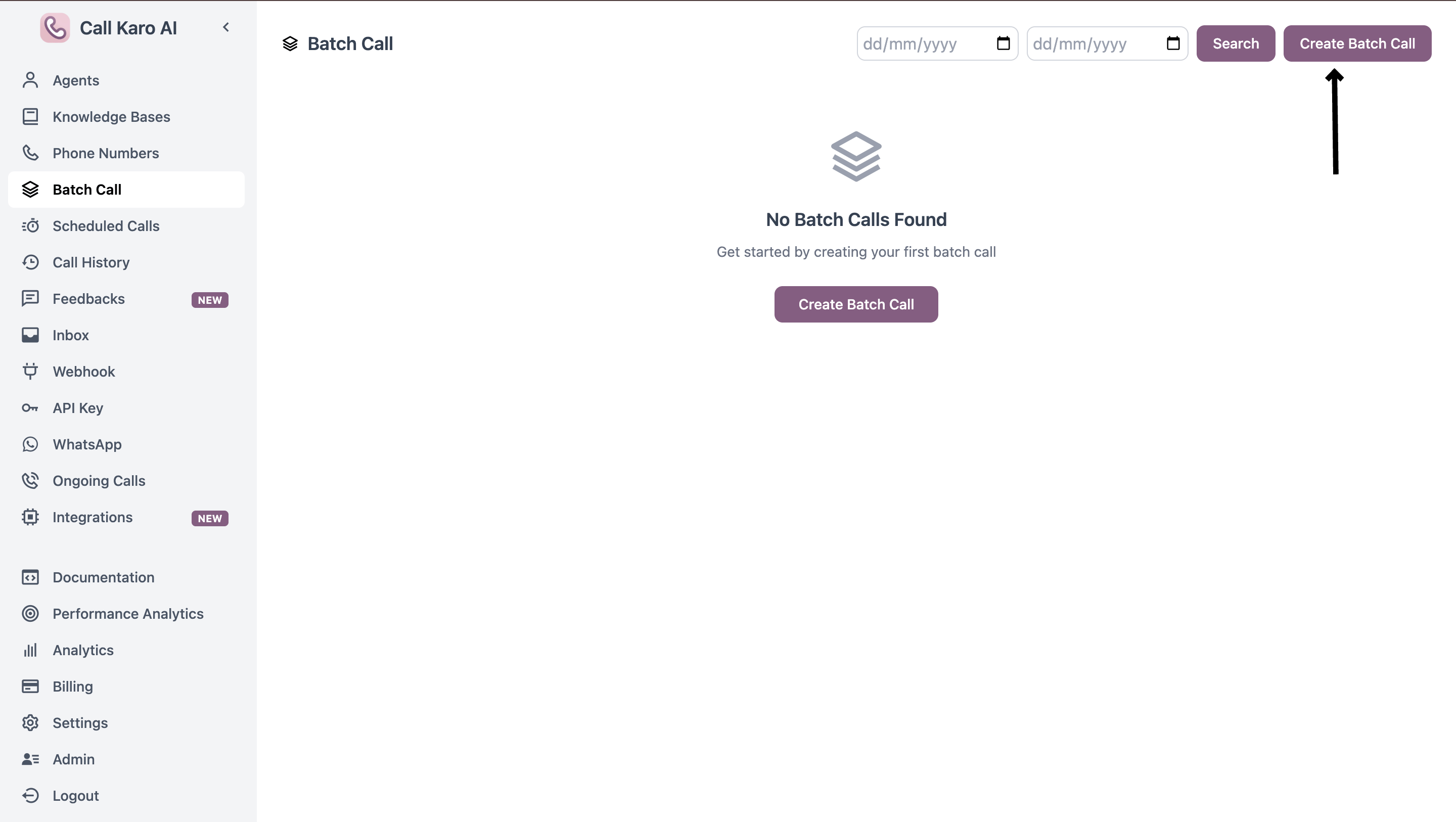
Navigate to the Batch Calls page and click **Create Batch Call**:
[https://callkaro.ai/dashboard/batch-calls](https://callkaro.ai/dashboard/batch-calls)
 ## Send Now
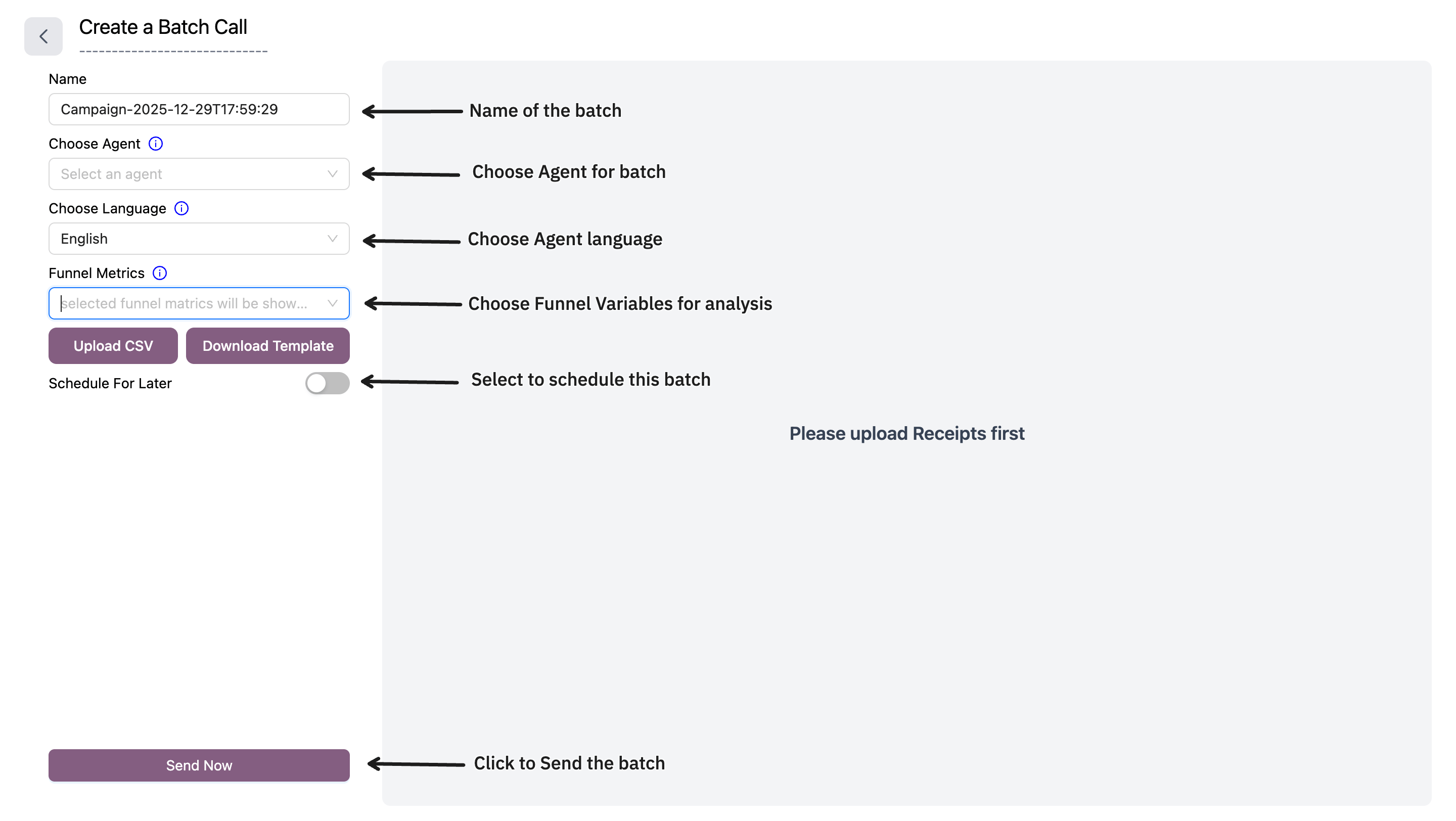
Use this mode to trigger calls immediately to all contacts in your CSV file.
### Required Fields
| Field | Description |
| ------------------- | ------------------------------------------------------------------------------------------------------ |
| **Name** | Batch call campaign name (auto-generated with timestamp) |
| **Choose Agent** | Select which AI agent will make the calls. Can be overridden per-call using `x_agent_id` column in CSV |
| **Choose Language** | Select call language. Can be overridden per-call using `x_language` column in CSV |
| **Funnel Metrics** | Select post-call boolean variables to track in funnel chart. Selection order determines chart order |
| **Upload CSV** | Upload CSV file with contact data. First column must be phone numbers |
### CSV Format
Your CSV file must have:
* **First column**: Phone numbers (required)
* **Additional columns**: Custom metadata for each call
#### Optional CSV Columns
| Column Name | Description |
| ---------------- | ------------------------------------------ |
| `x_agent_id` | Override agent for specific calls |
| `x_language` | Override language for specific calls |
| Any other column | Custom metadata accessible during the call |
**Example CSV:**
```csv theme={null}
phone_number,name,city,x_agent_id
919876543210,John,Mumbai,
918765432109,Sarah,Delhi,agent_id_123
```
## Send Now
Use this mode to trigger calls immediately to all contacts in your CSV file.
### Required Fields
| Field | Description |
| ------------------- | ------------------------------------------------------------------------------------------------------ |
| **Name** | Batch call campaign name (auto-generated with timestamp) |
| **Choose Agent** | Select which AI agent will make the calls. Can be overridden per-call using `x_agent_id` column in CSV |
| **Choose Language** | Select call language. Can be overridden per-call using `x_language` column in CSV |
| **Funnel Metrics** | Select post-call boolean variables to track in funnel chart. Selection order determines chart order |
| **Upload CSV** | Upload CSV file with contact data. First column must be phone numbers |
### CSV Format
Your CSV file must have:
* **First column**: Phone numbers (required)
* **Additional columns**: Custom metadata for each call
#### Optional CSV Columns
| Column Name | Description |
| ---------------- | ------------------------------------------ |
| `x_agent_id` | Override agent for specific calls |
| `x_language` | Override language for specific calls |
| Any other column | Custom metadata accessible during the call |
**Example CSV:**
```csv theme={null}
phone_number,name,city,x_agent_id
919876543210,John,Mumbai,
918765432109,Sarah,Delhi,agent_id_123
```
 ### Download Template
Click **Download Template** to get a sample CSV file with the correct format.
***
## Schedule For Later
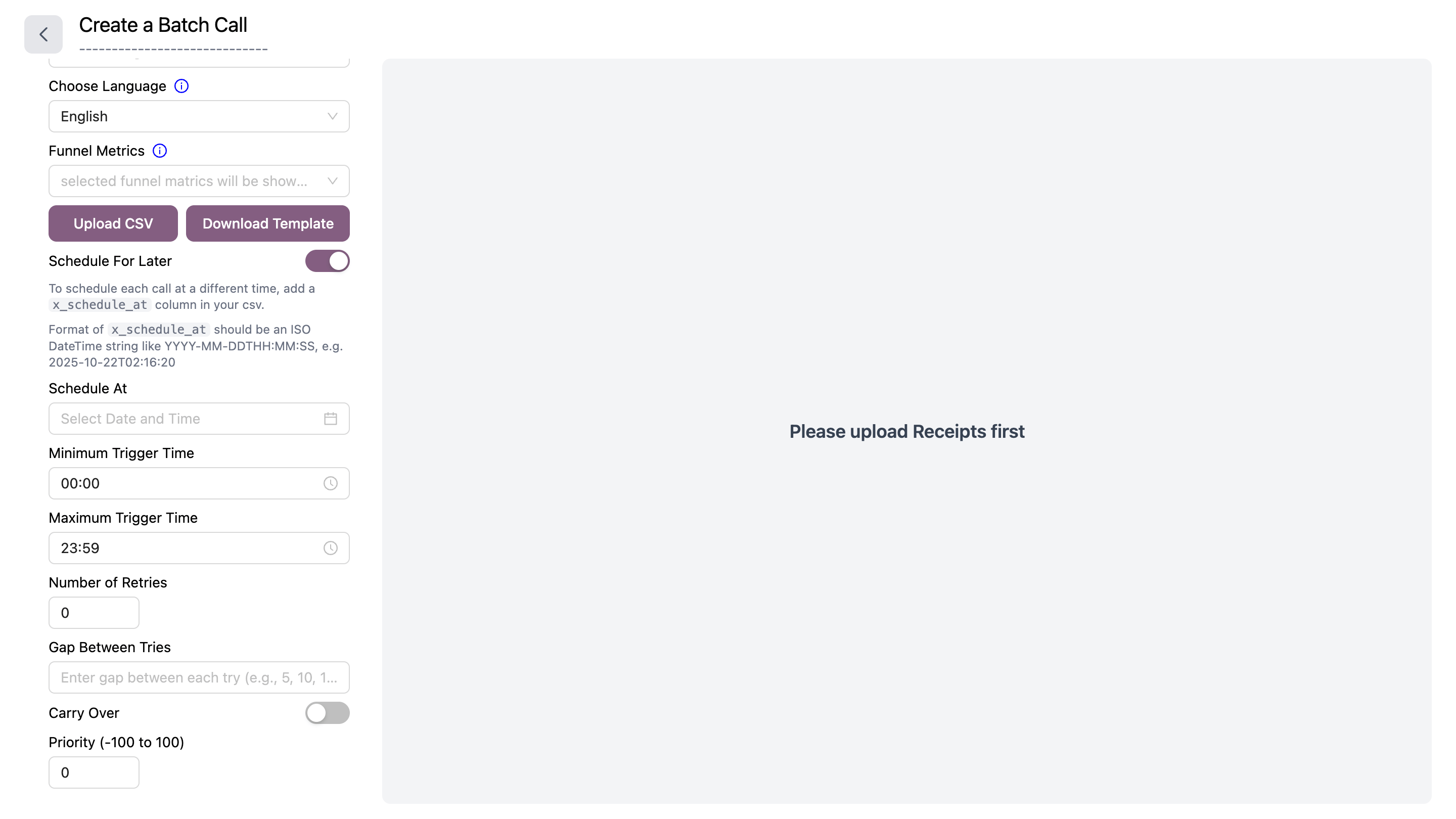
Use this mode to schedule calls for future execution with advanced retry logic and call windows.
Toggle **Schedule For Later** to enable scheduling options.
### Additional Fields
| Field | Description |
| ------------------------ | ------------------------------------------------------------------------------------------------------------------------------ |
| **Schedule At** | Date and time to start calling. Can be overridden per-call using `x_schedule_at` column in CSV (format: `YYYY-MM-DDTHH:MM:SS`) |
| **Minimum Trigger Time** | Earliest time of day calls can be triggered (HH:MM format) |
| **Maximum Trigger Time** | Latest time of day calls can be triggered (HH:MM format) |
| **Number of Retries** | How many times to retry failed/unanswered calls (0-N) |
| **Gap Between Tries** | Comma-separated minutes between retries (e.g., `5,10,15` for 5 min, then 10 min, then 15 min) |
| **Carry Over** | Toggle on to carry over remaining calls to next day if not completed |
| **Priority** | Call priority from -100 to 100. Higher priority calls are processed first |
### CSV Format for Scheduling
Same as Send Now, plus optional `x_schedule_at` column:
**Example CSV with individual scheduling:**
```csv theme={null}
phone_number,name,x_schedule_at
919876543210,John,2025-12-30T10:00:00
918765432109,Sarah,2025-12-30T14:30:00
```
### Download Template
Click **Download Template** to get a sample CSV file with the correct format.
***
## Schedule For Later
Use this mode to schedule calls for future execution with advanced retry logic and call windows.
Toggle **Schedule For Later** to enable scheduling options.
### Additional Fields
| Field | Description |
| ------------------------ | ------------------------------------------------------------------------------------------------------------------------------ |
| **Schedule At** | Date and time to start calling. Can be overridden per-call using `x_schedule_at` column in CSV (format: `YYYY-MM-DDTHH:MM:SS`) |
| **Minimum Trigger Time** | Earliest time of day calls can be triggered (HH:MM format) |
| **Maximum Trigger Time** | Latest time of day calls can be triggered (HH:MM format) |
| **Number of Retries** | How many times to retry failed/unanswered calls (0-N) |
| **Gap Between Tries** | Comma-separated minutes between retries (e.g., `5,10,15` for 5 min, then 10 min, then 15 min) |
| **Carry Over** | Toggle on to carry over remaining calls to next day if not completed |
| **Priority** | Call priority from -100 to 100. Higher priority calls are processed first |
### CSV Format for Scheduling
Same as Send Now, plus optional `x_schedule_at` column:
**Example CSV with individual scheduling:**
```csv theme={null}
phone_number,name,x_schedule_at
919876543210,John,2025-12-30T10:00:00
918765432109,Sarah,2025-12-30T14:30:00
```
 ***
## How It Works
1. Fill in the required fields
2. Upload your CSV file
3. Preview your data in the table on the right
4. Click **Send Now** or **Schedule For Later**
5. Confirm the action
6. Calls are queued and will start processing
Use `x_agent_id` and `x_language` columns in your CSV to assign different agents or languages to different contacts in the same batch.
The **Funnel Metrics** selection determines which post-call variables appear in your analytics funnel chart. The order you select them matters.
***
## How It Works
1. Fill in the required fields
2. Upload your CSV file
3. Preview your data in the table on the right
4. Click **Send Now** or **Schedule For Later**
5. Confirm the action
6. Calls are queued and will start processing
Use `x_agent_id` and `x_language` columns in your CSV to assign different agents or languages to different contacts in the same batch.
The **Funnel Metrics** selection determines which post-call variables appear in your analytics funnel chart. The order you select them matters.