> ## Documentation Index
> Fetch the complete documentation index at: https://docs.callkaro.ai/llms.txt
> Use this file to discover all available pages before exploring further.
# Call History
> View and search all your call records
## What is Call History?
Call History displays all calls made through Callkaro with powerful filters, detailed call information, and export capabilities.
## Accessing Call History
[https://callkaro.ai/dashboard/call-history](https://callkaro.ai/dashboard/call-history)
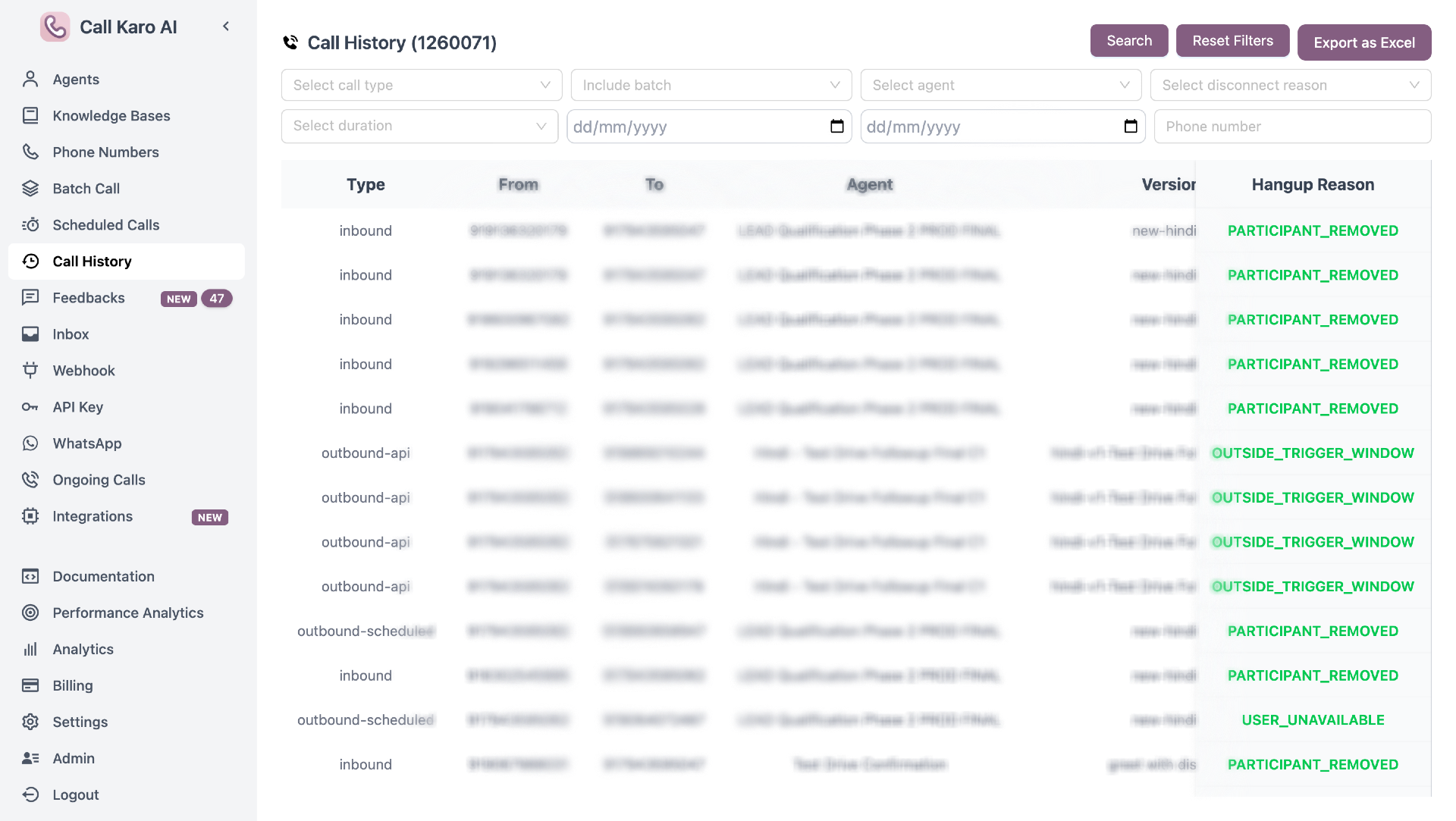 ## Filters
### Call Type
Filter by call source (multiple selection):
* **Inbound** - Calls received by agents
* **Outbound** - Regular outbound calls
* **Outbound API** - Calls via API
* **Outbound Scheduled** - Scheduled calls
* **Outbound Test Call** - Test calls
* **Agent Test** - Agent testing from UI
View more about Call Types
### Include Batch
* **All** - Both batch and non-batch
* **Batch** - Only batch campaigns
* **Non-Batch** - Only individual calls
### Agent
Select one or more agents (multiple selection)
### Disconnect Reason
Filter by hangup reason (multiple selection):
* CLIENT\_INITIATED
* PARTICIPANT\_REMOVED
* SESSION\_TIMEOUT
* USER\_BUSY
* INVALID\_PHONE\_NUMBER
* VOICEMAIL\_DETECTED
* And more...
View more about Hangup Reasons
### Duration
Filter by call length (multiple selection):
* **Not Connected** - 0 seconds
* **1-10s** - Very short
* **11-30s** - Short
* **31-60s** - Medium
* **>60s** - Long
### Date Range
* **Start Date** - Beginning of date range
* **End Date** - End of date range
### Phone Number
Search by specific phone number
## Table Columns
| Column | Description |
| ----------------- | --------------------------------------------------------------- |
| **Type** | Call type (inbound/outbound/etc.) |
| **From** | Caller's phone number |
| **To** | Recipient's phone number |
| **Agent** | AI agent that handled the call |
| **Version** | Agent version used |
| **Time** | When call occurred |
| **Disposition** | Call outcome (hover for full text) |
| **Last Stage** | Final call status (Converted/Connected/Not Connected/Voicemail) |
| **Duration** | Call length (formatted) |
| **Model** | LLM model used (hover for details) |
| **Voice** | Voice provider/name (hover for details) |
| **Transcriber** | STT provider (hover for details) |
| **Latency** | Average total latency (hover for breakdown) |
| **Cost** | Total cost (hover for breakdown) |
| **Hangup Reason** | Why call ended |
## Last Stage Status
Calls categorized into 4 stages:
* **Converted** (Green) - Call connected and conversion status = true
* **Connected** (Yellow) - Call connected but didn't convert
* **Not Connected** (Red) - Call didn't answer
* **Voicemail** - Reached voicemail
## Call Details Sidebar
Click any row to open detailed sidebar showing:
### Recording
* Audio player for call recording
* Download recording button
* Copy recording URL
### Transcription
Full call conversation transcript
### Post Call Data
All post-call variables and values
### Call Metadata
Additional call information
### Functions Called
Details of functions executed during call
## Export to Excel
Click **Export as Excel** to download all filtered calls with:
* Standard columns (Type, Phone, Agent, Version, Date, Time, Duration, etc.)
* All post-call variables
* All call metadata
* All function calls
**For large datasets:**
* Email modal appears
* Enter email address
* Excel file sent to email
## Actions
### Search
Click **Search** to apply selected filters
### Reset Filters
Clear all filters and return to unfiltered view
Use date ranges for faster results. Narrow time period = faster loading.
## Filters
### Call Type
Filter by call source (multiple selection):
* **Inbound** - Calls received by agents
* **Outbound** - Regular outbound calls
* **Outbound API** - Calls via API
* **Outbound Scheduled** - Scheduled calls
* **Outbound Test Call** - Test calls
* **Agent Test** - Agent testing from UI
View more about Call Types
### Include Batch
* **All** - Both batch and non-batch
* **Batch** - Only batch campaigns
* **Non-Batch** - Only individual calls
### Agent
Select one or more agents (multiple selection)
### Disconnect Reason
Filter by hangup reason (multiple selection):
* CLIENT\_INITIATED
* PARTICIPANT\_REMOVED
* SESSION\_TIMEOUT
* USER\_BUSY
* INVALID\_PHONE\_NUMBER
* VOICEMAIL\_DETECTED
* And more...
View more about Hangup Reasons
### Duration
Filter by call length (multiple selection):
* **Not Connected** - 0 seconds
* **1-10s** - Very short
* **11-30s** - Short
* **31-60s** - Medium
* **>60s** - Long
### Date Range
* **Start Date** - Beginning of date range
* **End Date** - End of date range
### Phone Number
Search by specific phone number
## Table Columns
| Column | Description |
| ----------------- | --------------------------------------------------------------- |
| **Type** | Call type (inbound/outbound/etc.) |
| **From** | Caller's phone number |
| **To** | Recipient's phone number |
| **Agent** | AI agent that handled the call |
| **Version** | Agent version used |
| **Time** | When call occurred |
| **Disposition** | Call outcome (hover for full text) |
| **Last Stage** | Final call status (Converted/Connected/Not Connected/Voicemail) |
| **Duration** | Call length (formatted) |
| **Model** | LLM model used (hover for details) |
| **Voice** | Voice provider/name (hover for details) |
| **Transcriber** | STT provider (hover for details) |
| **Latency** | Average total latency (hover for breakdown) |
| **Cost** | Total cost (hover for breakdown) |
| **Hangup Reason** | Why call ended |
## Last Stage Status
Calls categorized into 4 stages:
* **Converted** (Green) - Call connected and conversion status = true
* **Connected** (Yellow) - Call connected but didn't convert
* **Not Connected** (Red) - Call didn't answer
* **Voicemail** - Reached voicemail
## Call Details Sidebar
Click any row to open detailed sidebar showing:
### Recording
* Audio player for call recording
* Download recording button
* Copy recording URL
### Transcription
Full call conversation transcript
### Post Call Data
All post-call variables and values
### Call Metadata
Additional call information
### Functions Called
Details of functions executed during call
## Export to Excel
Click **Export as Excel** to download all filtered calls with:
* Standard columns (Type, Phone, Agent, Version, Date, Time, Duration, etc.)
* All post-call variables
* All call metadata
* All function calls
**For large datasets:**
* Email modal appears
* Enter email address
* Excel file sent to email
## Actions
### Search
Click **Search** to apply selected filters
### Reset Filters
Clear all filters and return to unfiltered view
Use date ranges for faster results. Narrow time period = faster loading.