> ## Documentation Index
> Fetch the complete documentation index at: https://docs.callkaro.ai/llms.txt
> Use this file to discover all available pages before exploring further.
# KPI Manager
> Connect your business metrics to your agents and find out why a number missed
KPI Manager connects your business numbers to your voice agents, and then explains the gap between the two.
You tell it which metrics matter for an agent — conversion rate, lead-to-sale percentage, connect rate, or any number that lives in your own systems — and what each one is supposed to hit. Every day, KPI Manager pulls the real value of those metrics, compares them against your targets, and when an agent falls short it automatically runs a Root Cause Analysis (RCA) over that day's calls.
The output is not another chart. It is a written report that names the specific reasons the number missed, quotes the evidence from real calls, points at the exact section of the agent's prompt that caused it, and proposes the literal fix — which you can then assign to a teammate or hand straight to AI FDE to implement.
 ## What it is not
* It is not a call-auditing tool. Auditing happens elsewhere in the platform; KPI Manager consumes those audits as evidence.
* It is not a dialer or campaign manager. It does not change who gets called.
* It does not change your agent by itself. Every recommended fix is reviewed by a human before anything ships.
## Why it matters
Most teams can already see that a number dropped. What costs them money is the days it takes to find out why. KPI Manager closes that loop overnight.
| Without KPI Manager | With KPI Manager | What you gain |
| ---------------------------------------------------------------------------- | ------------------------------------------------------------------------------------------------------------------------ | -------------------------------------------------------------------- |
| Someone notices conversion is down, usually days later, usually by accident. | Every configured metric is measured daily against its target, automatically. | Problems surface within one day instead of one week. |
| An analyst listens to a sample of calls and guesses at the cause. | An AI agent reads the day's audited calls, transcripts and post-call data and produces ranked root causes with evidence. | Hours of manual review replaced by a report you read in two minutes. |
| "The agent isn't closing well" — a diagnosis nobody can act on. | Each finding names the prompt section, quotes the problem text, and gives the exact replacement wording. | Findings that are directly executable, not opinions. |
| Fixes are prioritised by whoever shouts loudest. | Each cause carries a severity, a confidence level, and an estimated impact in percentage points on the metric. | You work on the fix with the biggest measurable upside first. |
| The same problem gets rediscovered every month. | Findings are compared against recent history and flagged as new or recurring, with updates on past fixes. | You can see whether a fix actually worked. |
| Handover to the engineering or prompt team is a Slack thread. | Every finding becomes a task card on a board, assignable to a person or to AI FDE. | A tracked path from "we found it" to "it's live in production". |
## Who benefits
| Role | Value delivered |
| ---------------------------- | ------------------------------------------------------------------------------------------------------------------------------------------------------- |
| **Business / Account owner** | A daily, plain-English answer to "is this agent hitting its numbers, and if not, why?" — delivered by email as a PDF, with no dashboard login needed. |
| **Campaign / Ops manager** | Metric trends per agent, the ability to scope analysis to a region, lead source or outcome, and a prioritised queue of fixes. |
| **Prompt / QA team** | Findings tied to specific prompt sections with literal replacement text, plus links to the exact calls that prove the point. |
| **Engineering** | Integration-level and technical causes (failing function calls, telephony drops, bad post-call instrumentation) separated out from conversational ones. |
## Core concepts
Six ideas cover the whole product. Everything else is detail.
| Concept | What it means |
| ---------------- | ------------------------------------------------------------------------------------------------------------------------------------------------------------------------------ |
| **Data Source** | Where a live number comes from. Either an API Endpoint Callkaro calls in your systems, or a block of Python Code you write that runs inside Callkaro and returns the number. |
| **KPI Metric** | A named business number — for example `conversion_rate` — pointed at a field in one of your data sources, together with the target it is expected to hit. |
| **RCA Prompt** | Free text that scopes and steers the analysis: which calls to look at, what to focus on, what to ignore, what to prioritise. Leave it blank and the analysis covers all calls. |
| **RCA Report** | The output of one analysis run for one agent on one day: the metrics missed, a plain-English summary, and a ranked list of root causes with recommended fixes. |
| **Root Cause** | One specific, evidenced reason a metric missed — with a category, a severity, a confidence level, the prompt section it lives in, and the literal fix. |
| **Pending Task** | A root cause promoted onto a work board, so it can be assigned, tracked through A/B testing, and closed out. |
## Where to find it
KPI Manager appears in two places, and the distinction matters: one is where you set it up, the other is where you read the results.
| Surface | Path | Used for |
| ------------------------- | ----------------------------------- | -------------------------------------------------------------------------------------- |
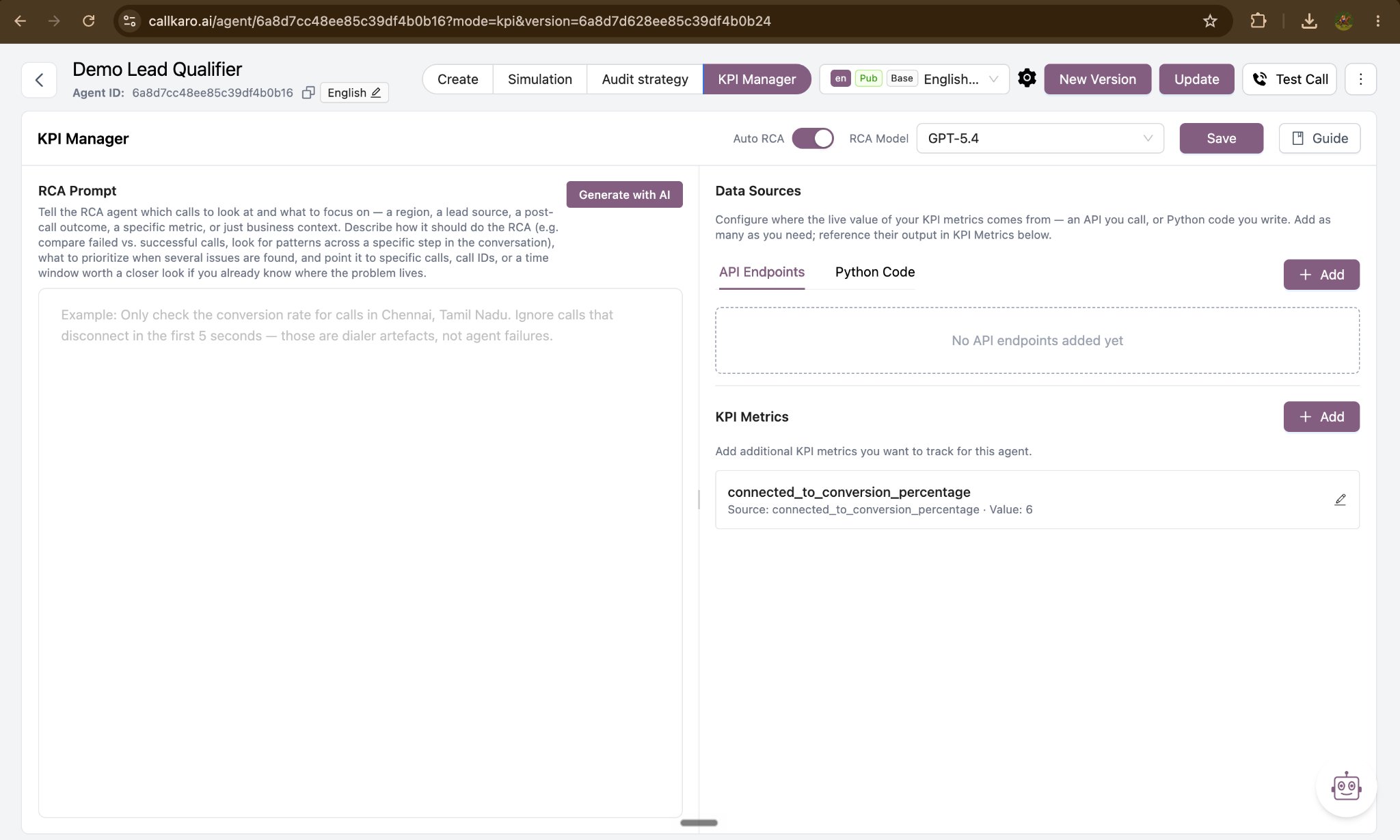
| **Agent configuration** | Open an agent → **KPI Manager** tab | Per-agent setup: data sources, KPI metrics, RCA prompt, RCA model, Auto RCA toggle. |
| **KPI Manager Dashboard** | Left sidebar → **KPI Manager** | Results across all agents: charts, RCA reports, pending tasks, and on-demand RCA runs. |
## What it is not
* It is not a call-auditing tool. Auditing happens elsewhere in the platform; KPI Manager consumes those audits as evidence.
* It is not a dialer or campaign manager. It does not change who gets called.
* It does not change your agent by itself. Every recommended fix is reviewed by a human before anything ships.
## Why it matters
Most teams can already see that a number dropped. What costs them money is the days it takes to find out why. KPI Manager closes that loop overnight.
| Without KPI Manager | With KPI Manager | What you gain |
| ---------------------------------------------------------------------------- | ------------------------------------------------------------------------------------------------------------------------ | -------------------------------------------------------------------- |
| Someone notices conversion is down, usually days later, usually by accident. | Every configured metric is measured daily against its target, automatically. | Problems surface within one day instead of one week. |
| An analyst listens to a sample of calls and guesses at the cause. | An AI agent reads the day's audited calls, transcripts and post-call data and produces ranked root causes with evidence. | Hours of manual review replaced by a report you read in two minutes. |
| "The agent isn't closing well" — a diagnosis nobody can act on. | Each finding names the prompt section, quotes the problem text, and gives the exact replacement wording. | Findings that are directly executable, not opinions. |
| Fixes are prioritised by whoever shouts loudest. | Each cause carries a severity, a confidence level, and an estimated impact in percentage points on the metric. | You work on the fix with the biggest measurable upside first. |
| The same problem gets rediscovered every month. | Findings are compared against recent history and flagged as new or recurring, with updates on past fixes. | You can see whether a fix actually worked. |
| Handover to the engineering or prompt team is a Slack thread. | Every finding becomes a task card on a board, assignable to a person or to AI FDE. | A tracked path from "we found it" to "it's live in production". |
## Who benefits
| Role | Value delivered |
| ---------------------------- | ------------------------------------------------------------------------------------------------------------------------------------------------------- |
| **Business / Account owner** | A daily, plain-English answer to "is this agent hitting its numbers, and if not, why?" — delivered by email as a PDF, with no dashboard login needed. |
| **Campaign / Ops manager** | Metric trends per agent, the ability to scope analysis to a region, lead source or outcome, and a prioritised queue of fixes. |
| **Prompt / QA team** | Findings tied to specific prompt sections with literal replacement text, plus links to the exact calls that prove the point. |
| **Engineering** | Integration-level and technical causes (failing function calls, telephony drops, bad post-call instrumentation) separated out from conversational ones. |
## Core concepts
Six ideas cover the whole product. Everything else is detail.
| Concept | What it means |
| ---------------- | ------------------------------------------------------------------------------------------------------------------------------------------------------------------------------ |
| **Data Source** | Where a live number comes from. Either an API Endpoint Callkaro calls in your systems, or a block of Python Code you write that runs inside Callkaro and returns the number. |
| **KPI Metric** | A named business number — for example `conversion_rate` — pointed at a field in one of your data sources, together with the target it is expected to hit. |
| **RCA Prompt** | Free text that scopes and steers the analysis: which calls to look at, what to focus on, what to ignore, what to prioritise. Leave it blank and the analysis covers all calls. |
| **RCA Report** | The output of one analysis run for one agent on one day: the metrics missed, a plain-English summary, and a ranked list of root causes with recommended fixes. |
| **Root Cause** | One specific, evidenced reason a metric missed — with a category, a severity, a confidence level, the prompt section it lives in, and the literal fix. |
| **Pending Task** | A root cause promoted onto a work board, so it can be assigned, tracked through A/B testing, and closed out. |
## Where to find it
KPI Manager appears in two places, and the distinction matters: one is where you set it up, the other is where you read the results.
| Surface | Path | Used for |
| ------------------------- | ----------------------------------- | -------------------------------------------------------------------------------------- |
| **Agent configuration** | Open an agent → **KPI Manager** tab | Per-agent setup: data sources, KPI metrics, RCA prompt, RCA model, Auto RCA toggle. |
| **KPI Manager Dashboard** | Left sidebar → **KPI Manager** | Results across all agents: charts, RCA reports, pending tasks, and on-demand RCA runs. |
 ## Next steps
The daily pass, and when an analysis does and does not run.
Add data sources, define metrics, and write the RCA prompt.
Charts, RCA reports, and the day-wise timeline.
Analyse a call set you choose yourself, on demand.
## Next steps
The daily pass, and when an analysis does and does not run.
Add data sources, define metrics, and write the RCA prompt.
Charts, RCA reports, and the day-wise timeline.
Analyse a call set you choose yourself, on demand.