
Overview

In-call functions execute during active AI calls when triggered by the AI agent. These allow your agent to perform real-time actions based on conversation context. Common Use Cases:
  • Check product availability
  • Book appointments (custom systems)
  • Validate customer information
  • Query databases
  • Call external APIs for live data

Execution Timing

[Call Starts] → [Conversation] → [AI Triggers Function] → [Function Executes] → [AI Responds with Result]
The AI agent decides when to call the function based on the description you provide.

Basic Mode

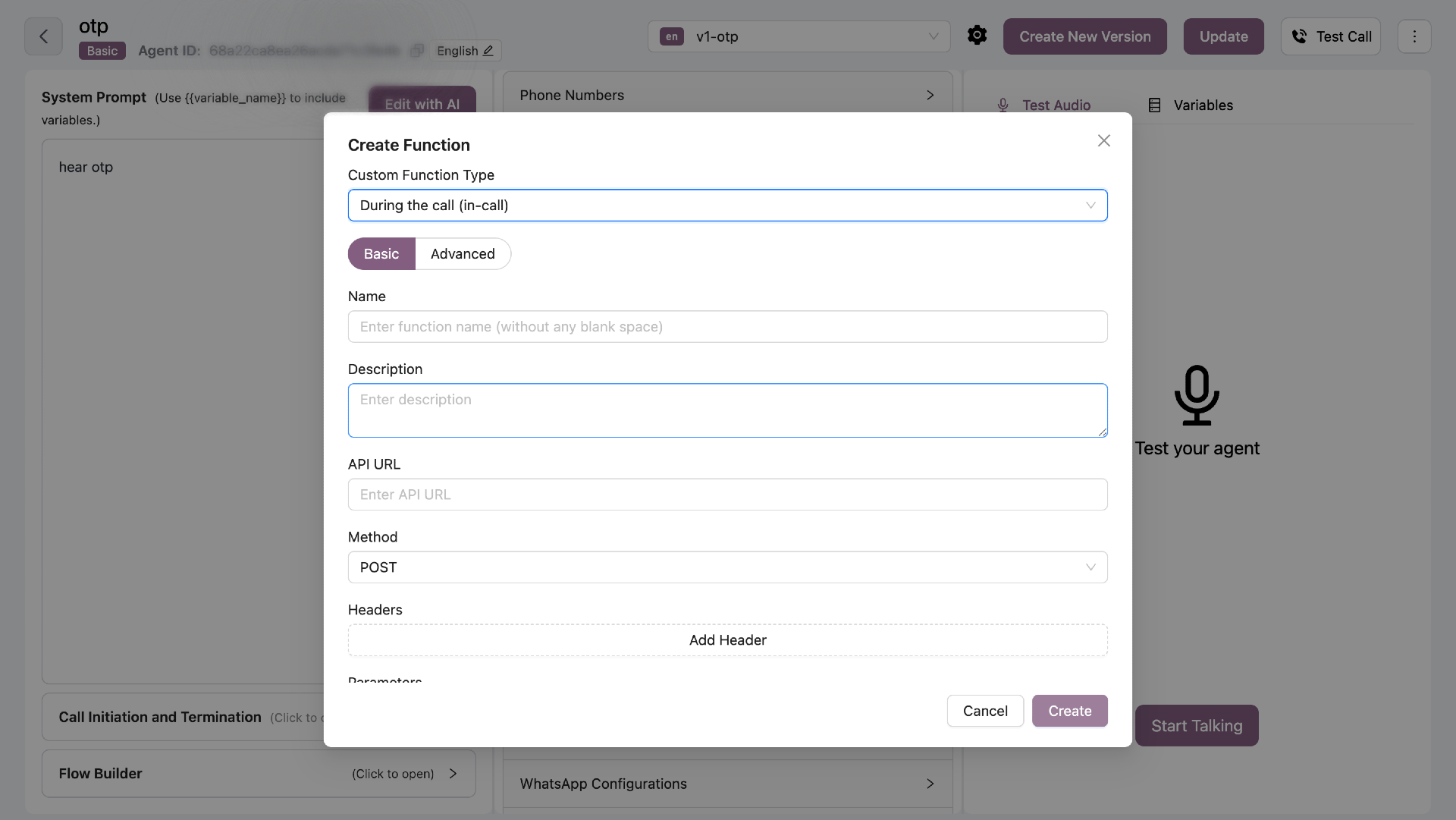
Configure API integrations with parameters that AI can fill. In-Call Basic Mode
Configuration Fields

FieldRequiredDescription
NameYesFunction name (no spaces)
DescriptionYesWhen AI should call this function
API URLYesEndpoint to call
MethodYesGET, POST, PUT, or DELETE
HeadersNoAuthentication headers
ParametersYesTyped parameters with descriptions

Description (AI Trigger)

The description tells the AI when to call this function. Example:
Check product availability when customer asks if an item is in stock
The AI will automatically call this function when it detects the customer asking about stock.

Parameters Configuration

Each parameter needs:
  • Key Name - Parameter name
  • Type - string or number
  • Description - What this parameter represents
Example Parameters:
Key: product_id
Type: string
Description: The unique product identifier

Key: quantity
Type: number
Description: Quantity customer wants to purchase
The AI will extract these values from the conversation and pass them to your API.

Advanced Mode (Python)

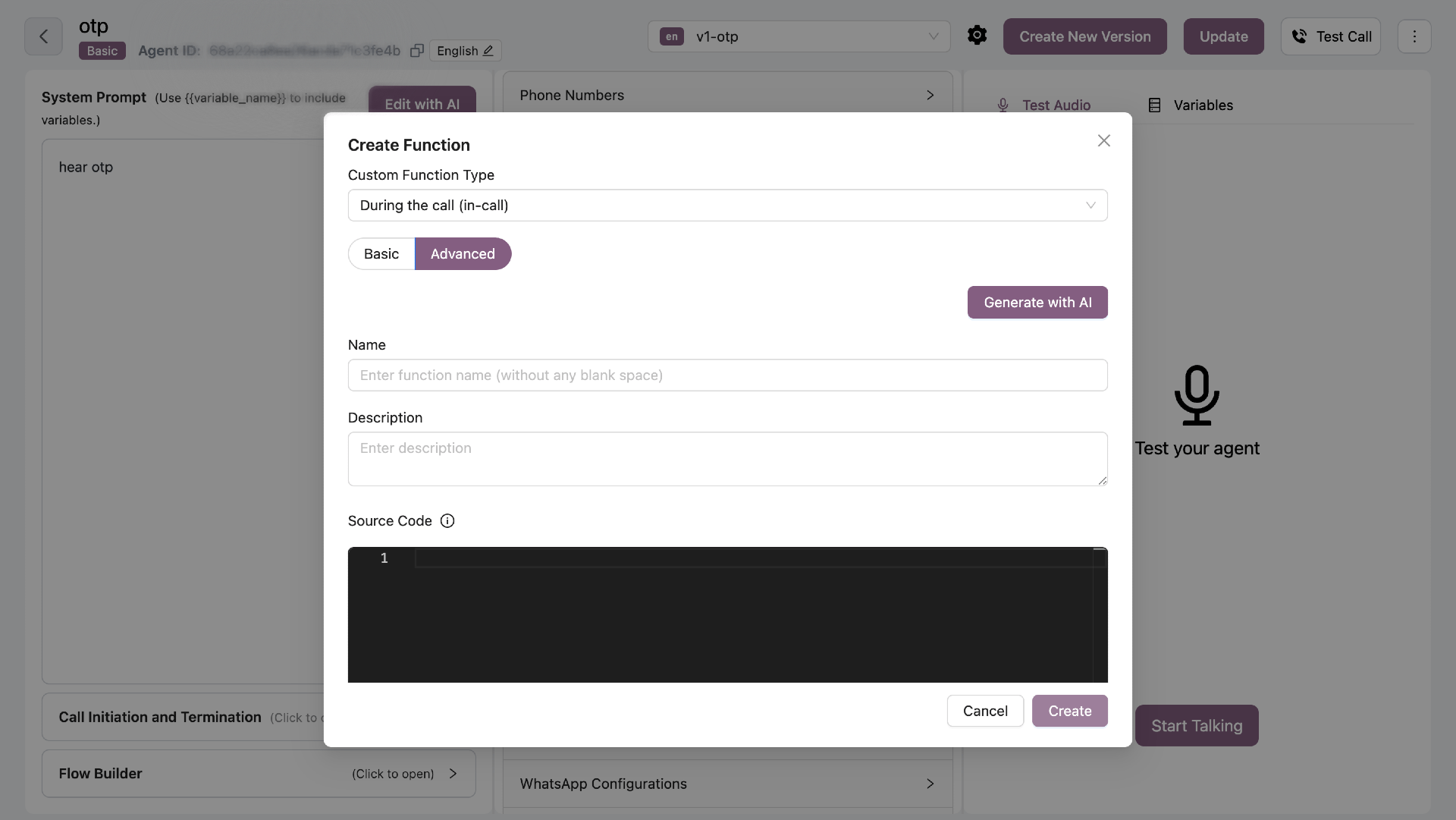
Write custom Python code with full control. In-Call Advanced Mode
Function Signature

async def function_name(
    ctx: RunContext,
    param1: str,
    param2: int = 1
) -> dict:
    """
    Function description for AI
    
    Args:
        ctx: LiveKit RunContext
        param1: Description of param1
        param2: Description of param2
        
    Returns:
        dict: {
            status: "success" | "error",
            data: { ... }
        }
    """
    # Your code here
Rules:
  • Must be async def
  • First parameter must be ctx: RunContext
  • All parameters must have type annotations
  • Must include detailed docstring
  • Must return dict with status field

Return Schema

Always return a dictionary with at least a status field:
# Success
return {
    "status": "success",
    "data": {"available": True, "quantity": 50}
}

# Error
return {
    "status": "error",
    "message": "Product not found"
}

Example: Check Weather

async def get_weather(
    ctx: RunContext,
    location: str,
    days: int = 1
) -> dict:
    """
    Get weather forecast for a location.
    
    Args:
        ctx: RunContext object
        location: City name or coordinates
        days: Number of days for forecast (1-7)
        
    Returns:
        dict: {
            status: "success" | "error",
            location: str,
            forecast: list[dict]
        }
    """
    # Input validation
    if not location or not isinstance(location, str):
        return {
            "status": "error",
            "message": "Location is required"
        }
        
    if not 1 <= days <= 7:
        return {
            "status": "error",
            "message": "Days must be between 1 and 7"
        }
    
    try:
        # Make API call with timeout
        async with httpx.AsyncClient(timeout=10.0) as client:
            response = await client.get(
                "https://api.weatherapi.com/v1/forecast.json",
                params={
                    "key": "YOUR_API_KEY",
                    "q": location,
                    "days": days
                }
            )
            
            if response.status_code != 200:
                return {
                    "status": "error",
                    "message": f"Weather API error: {response.status_code}"
                }
                
            data = response.json()
            
            return {
                "status": "success",
                "location": data["location"]["name"],
                "forecast": [
                    {
                        "date": day["date"],
                        "condition": day["day"]["condition"]["text"],
                        "max_temp": day["day"]["maxtemp_c"]
                    }
                    for day in data["forecast"]["forecastday"]
                ]
            }
            
    except httpx.RequestError as e:
        logger.error(f"Weather API request failed: {e}")
        return {
            "status": "error",
            "message": "Failed to fetch weather data"
        }

AI Generation

Click “Generate with AI” to create functions using natural language. Example Prompt:
Create a function to check product availability from our inventory API.
It should take product_id as parameter and return stock quantity.
API endpoint: https://api.example.com/inventory/check
The AI generates complete code with error handling, validation, and proper return schema.

Allowed Types

Parameter Types:
  • str, int, float, bool
  • None
  • dict, list
  • JSON-serializable types

Security Requirements

  • Input Validation - Always validate inputs
  • No Filesystem - Never read/write files
  • No OS/Process - Avoid subprocess, os.system
  • No Eval - Never use eval() or exec()
  • Timeouts - Set timeouts for external calls
  • Error Handling - Catch and return errors properly

Best Practices

  • Keep functions focused - One function, one purpose
  • Validate inputs - Check all parameters before use
  • Set timeouts - Don’t let API calls hang
  • Return clear errors - Help AI understand what went wrong
  • Log important events - Use logger for debugging
  • Handle edge cases - Test with various inputs
Write detailed descriptions and docstrings - they help the AI know when and how to call your function.